Announcements
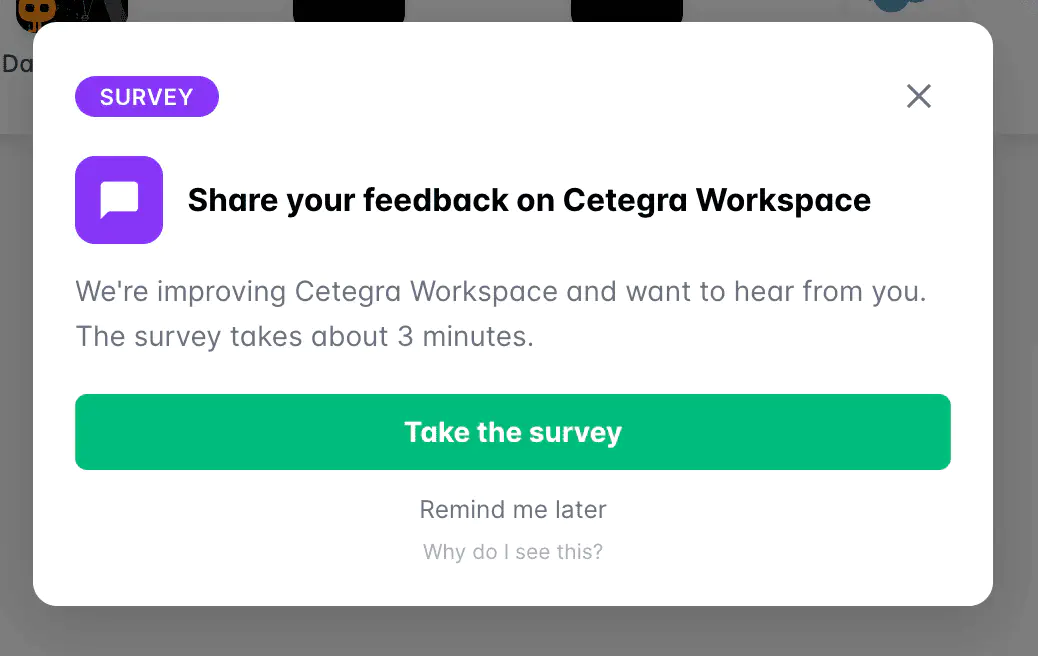
Cetegra occasionally shows announcement pop-ups to inform you about surveys, maintenance windows, news, and tips. This article explains what they are and how to handle them.
What is an announcement?
Announcements are short pop-up messages managed by the Cetegra team at Cegal. They are used to share important information directly inside the portal — for example:
- Surveys — short feedback forms your organization has agreed to participate in
- Maintenance — planned or unplanned downtime and service interruptions
- News — product updates or upcoming changes that affect your environment
- Tips — helpful hints about getting more out of Cetegra
Why am I seeing this?
Announcements are only shown to users in an organization when either:
- It has been agreed upon with your organization (for example a survey or a news update), or
- It is of high importance to your environment — such as planned maintenance, unplanned outages, or upcoming breaking changes.
You will only ever see announcements that are relevant to your organization’s Cetegra environment.
What should I do?
If there is an action button
The button opens a link relevant to the announcement. This will be one of:
- A page within Cetegra Workspace or another Cetegra or Cegal product
- An external platform approved and used by Cegal as part of the service delivery — for example a survey tool (such as Qualtrics), a technical portal (such as ServiceNow), or similar
Click the button to complete the requested action. Once you click it, the announcement will not appear again.
If there is no action button, or you want to dismiss it
Click the X button at the top right of the announcement, or click the text link at the bottom (Remind me later or Don’t show again). The announcement will close immediately.
Why might I see the same announcement again?
This depends on the display settings configured for the announcement:
| Display mode | What it means |
|---|---|
| Show once | You will see it once. After you dismiss it or click the action, it will not reappear. |
| Every N days | The announcement reappears every N days until you click the action button. Dismissing it with × or “Remind me later” closes it for now, but it will return after the interval. |
| Until action clicked | The announcement keeps reappearing on every session until you click the action button. Dismissing it with × closes it for that session only. |
If you want an announcement to stop appearing permanently, click the action button if one is available. For Show once announcements, a single dismiss is enough.
Is this a phishing message?
No. Announcements are managed exclusively by the Cetegra team at Cegal — they cannot be created or sent by external parties. The pop-up appears inside the Cetegra portal itself and does not originate from email or any other external source.
Questions or concerns?
If you have questions about a specific announcement or are unsure whether it is legitimate, please reach out to Cegal support.