Hybrid Sync
Hybrid Sync keeps your Cetegra Workspace users and groups in sync with both on-premises Active Directory and cloud-based identity sources.
What is Hybrid Sync?
Hybrid Sync is an add-on for Cetegra Workspace that automates the synchronisation of users and groups from your organisation’s identity directories. It supports two sync paths running in parallel:
- Cloud sync — handles user and group accounts sourced from Azure AD / Microsoft Entra ID
- On-premises sync — handles accounts sourced from on-premises Active Directory domains
This means organisations with both cloud-based and on-premises identities have a single, unified view of all users and groups in Cetegra Workspace, regardless of where those accounts originate.
How it works
When Hybrid Sync is enabled for your tenant, a sync service continuously monitors your connected directories for changes and applies them to Cetegra Workspace. New accounts, updated attributes, group membership changes, and disabled accounts are all handled automatically.
The sync paths are independent — the cloud sync and on-premises sync each manage their respective domains without interfering with one another. Users and groups appear the same way in Workspace regardless of which path brought them in.
Key behaviours:
- User and group accounts are created, updated, and disabled in Workspace automatically — no manual intervention required.
- Changes to accounts in the source directory (name, email, department, group membership) are reflected in Workspace on the next sync cycle.
- Accounts created manually in the Workspace portal are not affected by sync.
Impact on users
With Hybrid Sync active, users from connected directories are created and maintained automatically. This changes the typical user management workflow:
- Most users will already exist in Workspace before you need to interact with them.
- Attribute changes (name, email, phone) should be made in the source directory, not in Workspace — they will sync across on the next cycle.
- Provisioning and deprovisioning (onboarding/offboarding) follows the lifecycle in the source directory.
Read more about managing users in Workspace →
Impact on groups
Groups from connected directories are synced automatically, including their memberships. This means:
- Group membership is maintained in the source directory; Workspace reflects it.
- Access to Workspace features, Catalog products, and applications tied to groups will follow sync automatically.
- Groups created manually in Workspace are unaffected by sync.
Read more about managing groups in Workspace →
Catalog ordering and group compatibility
In a hybrid environment, not every user can be added to every group. Groups are either cloud-based (Entra ID only) or on-premises, and a user’s account must exist in the right directory before they can be added.
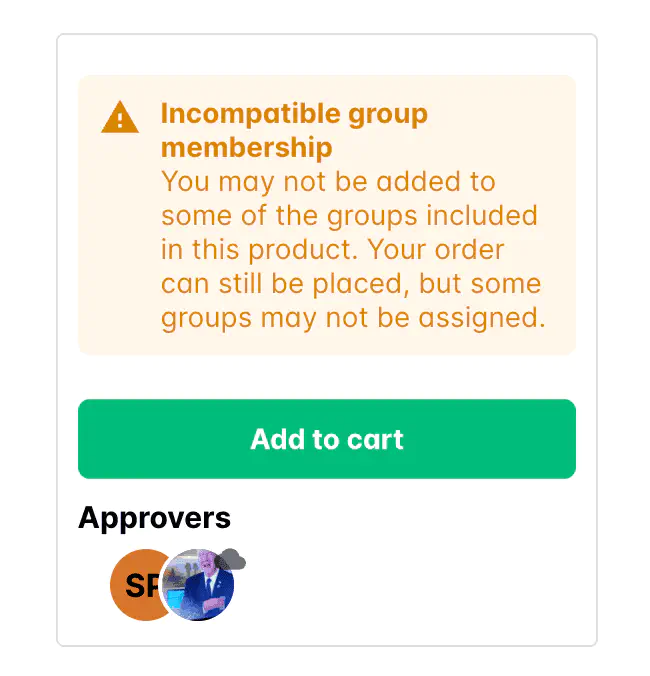
When a user orders a Catalog product that includes group assignments, Workspace checks whether the user is compatible with each group. If a mismatch is detected, the following warning is shown before the user confirms the order:
Incompatible group membership You may not be added to some of the groups included in this product. Your order can still be placed, but some groups may not be assigned.
The most common scenarios that trigger this warning:
| Situation | What happens |
|---|---|
| On-premises user ordering a product with a cloud-only group | The user’s account exists only in the on-premises directory and cannot be added to a cloud-only group directly. |
| Cloud-only user ordering a product with an on-premises group | The user’s account exists only in Entra ID and cannot be added to an on-premises group. |
| Cloud-only user ordering a product with a directory-synced group | The group is synced from on-premises to the cloud — members must be added in the on-premises directory first, then the change syncs automatically. |
Order behaviour:
- If only some groups are incompatible, the order can still be placed. Compatible groups will be assigned; incompatible ones will be skipped.
- If all groups in the product are incompatible, the order is blocked and cannot be submitted.
If you see this warning and are unsure whether to proceed, contact your Workspace administrator. They can verify which groups will be assigned and whether an alternative product or process is available.
Read more about Catalog ordering →
Cloud-only tenants
Organisations running Cetegra Workspace without any on-premises infrastructure use the cloud sync path exclusively. Hybrid Sync for cloud-only tenants provides:
- Reliable, continuous synchronisation with Azure AD / Microsoft Entra ID
- Improved visibility into sync activity and any errors
No special configuration is needed to use the cloud-only path — when Hybrid Sync is enabled, the appropriate sync path is activated based on your tenant’s directory setup.
Enabling Hybrid Sync
Hybrid Sync is an optional add-on that must be enabled per tenant. Contact your Cetegra administrator or Cegal support to enable it for your organisation.
Once enabled, the sync begins automatically. Existing users and groups in your directories will be imported on the first sync cycle.
Note: After initial enablement, verify that users and groups are appearing correctly in Workspace. Contact Cegal support if you notice any discrepancies.